

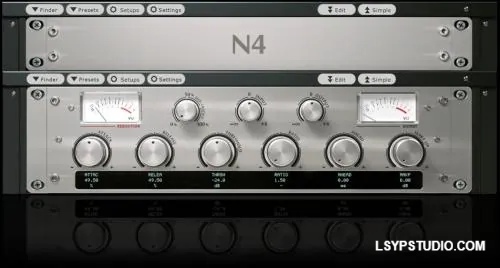
![图片[1]-陷波滤波器(+调制效果)Cupwise YouRei EQ BP and Notch Filters (+modulation FX) V2 [Nebula]-乐声音频-资源网](https://lsypstudio.com/wp-content/uploads/2026/01/image-2026-01-29T120850.766.jpg)
P2P | 28 January 2026 | 398 MB
本采样自与我的 Yourei HP/LP 相同的硬件,包括带通滤波器和陷波滤波器,以及两个直通/音调程序。我还制作了峰值和截止频段程序,它们非常适合通用均衡,并且是我本次合集的重点,在原版发布十多年后进行了重大更新。
该设备的陷波滤波器因其极其锐利的陷波而广泛应用于法庭音频工作,它可以精确地去除不需要的特定频率噪声,而不会对保留的音频产生不利影响。一些用户发现了这些滤波器的更具创意的用途,例如,通过扫频可以产生独特的类似相位器的效果。这启发我利用 Nebula 内置的 LFO 和包络跟随器来最大化其潜力,从而创建一些不错的调制效果。
所有程序都可通过三个模块访问:
-主模块-
峰值频段- 可在 26 至 26070 Hz 范围内调节。增益可达 11dB 以上。带宽可从极窄到相当宽进行调节。这是一个非常棒的峰值均衡频段,硬件本身没有这个选项,所以我通过将带通滤波器与设备中的一个平坦直通采样混合来创建它。
陷波滤波器——在最锐利的设置下,它可以精确地去除不需要的特定频率噪声,而对其他信号的影响很小。我将陷波采样与直通采样结合起来,这样就可以减小陷波的切频深度,这是硬件无法实现的!
切频带——类似于陷波程序,但我移除了最锐利的陷波采样,并限制了切频深度,因此选项范围更接近典型的切频均衡频段。移除这些采样还可以使它的加载速度比陷波程序更快一些。带通
滤波器——这可能是最不常用的选项,但如果您需要,它就在这里!
直通程序——这些程序可以为您提供一些来自设备的音色。这两个程序都使用了略微不同的设置进行采样,因此会产生略微不同的结果。
-LFO模块-
此模块上的主程序选择矩阵允许您从各种LFO波形中进行选择,以配合三种滤波器类型:峰值滤波器、带通滤波器和切/陷波滤波器。
带通滤波器能够滤除大部分频谱,因此效果最为显著。切/陷波滤波器可以产生类似相位器的效果。峰值滤波器可以与随机LFO波形配合使用,通过随机增强特定范围内的不同频率来创造一种“人性化”效果;或者,它也可以与正弦波或三角波波形配合使用,产生扫频效果。
这些效果均使用我自行开发的自定义LFO控制设置,从而可以对效果进行精细控制。
较小的程序矩阵包含三个程序,可用于 DAW 中的自动化控制。它们与主模块中的程序类似,但针对滤波器扫描的自动化进行了优化,或可与 DAW 的内置调制/LFO 功能配合使用。——
包络跟随器模块——
所有三种滤波器类型均提供正向和反向扫描选项。正向扫描时,滤波器会随着输入电平的增加而向上扫描;反向扫描则相反,滤波器会随着输入电平的增加而向低频扫描。
这些程序完全是定制的。我已尝试设置它们的默认参数,以便在输入动态信号(例如鼓声)时立即产生明显效果。之后,您可以根据需要进行微调。
当然,您还将获得 44.1kHz、48kHz、88.2kHz 和 96kHz 版本。
Sampled from the same hardware as my Yourei HP/LP, here the band-pass and notch were sampled, as well as two pass-through/tone programs. I also made peak and cut band programs which work really well for general EQ purposes, and which I’ve made into the focus of this collection, with a major update over 10 years after the original release.
The notch filter on the unit was heavily used in forensic audio work, due to its extremely sharp notches which can precisely remove unwanted frequency specific noises without adversely affecting the kept audio. Some users found more creative uses for these filters, which could make unique phaser-like effects when swept around. That inspired me to maximize that potential using Nebula’s built in LFO and envelope follower to create some nice modulation effects.
The programs are all accessible from 3 modules:
-the main module-
peak band- Can be adjusted from 26 to 26070 Hz. Boosts up to over 11dB. Bandwidth adjustable from unusually narrow to fairly wide. This is a really nice peak EQ band, and wasn’t an option with the hardware, so I created it by blending the bandpass with a flat pass-through sample from the unit.
notch filter- At the sharpest setting it allows you to surgically remove unwanted frequency specific noises with little effect to anything else. I combined the notch samples with the pass-through, which allows you to reduce notch cut depth, which isn’t possible on the hardware!
cut band- Like the notch program, but I removed the sharpest notch samples, and limited the cut depth, so the range of options is more focused on being like a typical cutting EQ band. Removing those samples also allows this to load a little faster than the notch program.
band-pass filter- This is probably the least useful option, but it’s here if you want it!
pass-through programs- These give you some tone from the unit. Both were sampled with slightly different settings and produce slightly different results.
-the LFO module-
The main program selection matrix on this module allows you to select from various LFO shapes, for use with the 3 filter types- peak, BP, and cut/notch.
The BP provides the most drastic effect since it’s filtering out most of the spectrum. The cut/notch choices can produce phaser-like results. The peak can be used to create a kind of ‘humanization’ effect with the random LFO shape, by having it randomly emphasizer different frequencies in a specific range, or it can be used for a sweeping effect with the sine or triangle shapes.
These use a custom LFO control setup I developed myself which gives a great amount of control over the effect.
The smaller program matrix has three programs for use with automation within your DAW. They are just like the programs in the main module, except these are optimized for automating filter sweeps, or using with your DAW’s built-in modulation/LFO options.
-the envelope follower module-
You get forward and backward sweeping options for all three filter types. With forward, the filters sweep upward as your input level increases. With backwards the opposite happens- filters sweep to lower frequencies as your input level increases.
These programs are entirely custom made. I have attempted to set up their default settings so that you will have a noticeable effect right away, if sending in a dynamic input like drums. From there you can fine-tune the settings as you wish.
Of course you will get 44.1, 48, 88.2, and 96khz versions.
Here’s a video demoing the boost/cut EQ usage:
Here’s a video demoing some of the much more exciting LFO possibilities:
A video showing the envelope follower off as best as I could:
Here’s one showing off the ability to use the notch filters for precise forensic audio work:
https://www.cupwise.com/shop/yourei-eq-bp-notch-filters-modulation-fx/
乐币5
![乐器均衡器Final Mix Software WESTLAKE EQ III v3.0.3 [WiN, MacOSX]-乐声音频-资源网](https://lsypstudio.com/wp-content/uploads/2026/08/image-2026-08-07T221527.916-800x215.jpg)

![母带处理的真正艺术Steinberg WaveLab Pro 13 v13.0.30 [WiN]-乐声音频-资源网](https://lsypstudio.com/wp-content/uploads/2026/08/下载-8-1-800x533.jpg)




![FM、频谱、波表、虚拟模拟和颗粒合成Steinberg HALion 7 v7.5.0 [WiN]-乐声音频-资源网](https://lsypstudio.com/wp-content/uploads/2026/08/下载-7-1-800x534.jpg)
![母带处理-LANDR Mastering Plugin PRO v1.1.35 U2B FIXED [MacOSX]-乐声音频-资源网](https://lsypstudio.com/wp-content/uploads/2025/12/image-520.png)
![频谱动态压缩器-Sonible Smart Comp 3 v1.0.1 [WiN]-乐声音频-资源网](https://lsypstudio.com/wp-content/uploads/2025/12/image-521.png)
![母带处理-LANDR Mastering Plugin Pro v1.1.35 [WiN]-乐声音频-资源网](https://lsypstudio.com/wp-content/uploads/2025/12/image-522.png)

![高级混响处理工作站Cloudy Samples Cyberverb RETAiL [WiN, MacOSX]-乐声音频-资源网](https://lsypstudio.com/wp-content/uploads/2026/08/image-2026-08-09T084613.681-800x800.jpg)
![弹性电平器 AI 辅助软底限位门Mercurial Tones Tether v1.2.1 [WiN]-乐声音频-资源网](https://lsypstudio.com/wp-content/uploads/2026/08/下载-3-800x583.jpg)
![Kush Audio Bundle v2025.11 [U2B] [MacOSX]-乐声音频-资源网](https://lsypstudio.com/wp-content/uploads/2025/12/image-551.png)











