![均衡器Cupwise Tube Amp EQ + bonus [Nebula]-乐声音频-资源网](https://lsypstudio.com/wp-content/uploads/2026/01/image-2026-01-22T162933.853-800x600.jpg)


![图片[1]-均衡器Cupwise Tube Amp EQ + bonus [Nebula]-乐声音频-资源网](https://lsypstudio.com/wp-content/uploads/2026/01/image-2026-01-22T162933.853.jpg)
P2P | 21 January 2026 | 209 MB
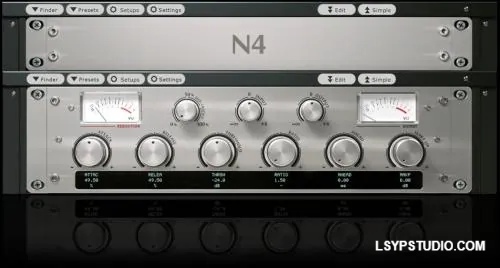
为了确保最终效果忠实还原20世纪50年代随多款唱机主机一同销售的经典硬件音色,我们投入了大量的时间和精力。该音色库的核心部分——均衡器(EQ)——在三种不同的硬件配置下进行了采样,从而呈现出三种不同的音色风格。“低音”旋钮主要用作可调高通滤波器,“高音”旋钮则用作搁架式滤波器。它们还可以组合使用,创建类似倾斜效果的均衡器设置(请查看手册中的频率响应图以了解具体功能)。音色库中的滤波器效果器部分是一个(不错的)额外功能。
所有三种“音色风格”的均衡器都采样了动态特性。动态特性在Nebula均衡器程序中非常罕见。通常,您需要将一个均衡器程序与另一个包含动态特性的程序搭配使用。而在这里,所有功能都集成在一个程序中。这样,通过低音/高音控制的每一个可能位置/组合,您都能获得更完整的放大器音色表现。这需要更长的采样时间,但也会产生更大更复杂的程序。虽然这比普通的 Nebula EQ 需要更多的 CPU 资源,但声音也更加真实。为了尽量减少 CPU 占用,我制作了一些“精简版”程序,这些程序不像标准版那样包含完整的模型,因此您可以使用它们来找到所需的 EQ 设置,然后再切换到更高质量的版本进行渲染。
此外,该套装还包含一些定制的自动哇音效果。这些效果的制作也使用了 Philco 放大器以及其他一些设备。其中一些程序使用了包络跟随器,因此峰值滤波器(结合放大器的高频均衡增益)会根据输入音频的变化而变化。这些程序有几个不同的版本,它们的行为各不相同,一半程序会随着输入电平的增加而“上升”,另一半程序则会随着输入电平的增加而“下降”。还有一些程序使用 LFO 来控制滤波,并具有不同的 LFO 波形。这个库的功能非常丰富,我在这里实在无法一一解释。你需要实际使用一段时间才能了解它的全部功能,所以我认为它是EQ程序的一个非常棒的附加功能。
Much time and effort went into making sure that the end results were faithful to the classic sounding hardware, which was sold with several phonograph consoles back in the 1950’s. For the main portion of this library, the EQ, it was sampled in 3 different hardware setups, for 3 different flavors. The ‘bass’ knob mostly acts as an adjustable high pass, and ‘treble’ as a shelf. Together they can also be used to create ’tilt-like’ eq setups (check the freq response graphs in manual to see what’s possible). The filter FX side of the library is a (nice) bonus.
All 3 ‘flavors’ of the EQ were sampled with dynamic behavior. Dynamics are very rare in Nebula EQ programs. Usually you have to pair an EQ program with another that includes the dynamics. Here, it’s all in one program. This way, with every possible position/combination of the bass/treble controls, you are getting a more complete representation of the amp. This requires more time to sample, but also results in much bigger and more complex programs. This requires a little more CPU than a usual Nebula EQ, but the sound is that much more authentic. To minimize the issue with the CPU, I’ve made ‘lite’ programs you can use which don’t have such full models as the standard ones, so you can use them to find the EQ settings you want before switching over to the higher quality versions before rendering.
Also included in the set are some custom made auto-wah effects. The Philco amp was also used in the creation of these, along with other things. Some of these programs use an envelope follower, so a peak filter (combined with the amp’s treble eq gain) moves in response to input audio. There are a few different versions of these programs which behave differently, with half going ‘up’ and the other half going ‘down’ in frequency as input level increases. There are other programs that use an LFO to control the filtering, with various LFO shapes. There are a LOT of possibilities with this side of the library, and I really couldn’t explain it all here. You would really have to use it for a while to get an idea of what’s possible, so I think it makes a really nice bonus to the EQ programs.
![乐器均衡器Final Mix Software WESTLAKE EQ III v3.0.3 [WiN, MacOSX]-乐声音频-资源网](https://lsypstudio.com/wp-content/uploads/2026/08/image-2026-08-07T221527.916-800x215.jpg)

![母带处理的真正艺术Steinberg WaveLab Pro 13 v13.0.30 [WiN]-乐声音频-资源网](https://lsypstudio.com/wp-content/uploads/2026/08/下载-8-1-800x533.jpg)




![FM、频谱、波表、虚拟模拟和颗粒合成Steinberg HALion 7 v7.5.0 [WiN]-乐声音频-资源网](https://lsypstudio.com/wp-content/uploads/2026/08/下载-7-1-800x534.jpg)
![母带处理-LANDR Mastering Plugin PRO v1.1.35 U2B FIXED [MacOSX]-乐声音频-资源网](https://lsypstudio.com/wp-content/uploads/2025/12/image-520.png)
![频谱动态压缩器-Sonible Smart Comp 3 v1.0.1 [WiN]-乐声音频-资源网](https://lsypstudio.com/wp-content/uploads/2025/12/image-521.png)
![母带处理-LANDR Mastering Plugin Pro v1.1.35 [WiN]-乐声音频-资源网](https://lsypstudio.com/wp-content/uploads/2025/12/image-522.png)

![高级混响处理工作站Cloudy Samples Cyberverb RETAiL [WiN, MacOSX]-乐声音频-资源网](https://lsypstudio.com/wp-content/uploads/2026/08/image-2026-08-09T084613.681-800x800.jpg)
![弹性电平器 AI 辅助软底限位门Mercurial Tones Tether v1.2.1 [WiN]-乐声音频-资源网](https://lsypstudio.com/wp-content/uploads/2026/08/下载-3-800x583.jpg)
![Kush Audio Bundle v2025.11 [U2B] [MacOSX]-乐声音频-资源网](https://lsypstudio.com/wp-content/uploads/2025/12/image-551.png)











