

![图片[1]-PreSonus – Studio One Pro 7 for MacOS-乐声音频-资源网](https://lsypstudio.com/wp-content/uploads/2025/12/image-38.jpg)
- 下载 PreSonus – Studio One Pro 7 v7.0.0 Rev2 [U2B + R2R 注册机]
- 原发行商:PreSonus
- 版本:7.0.0
- 类别:数字音频工作站
- 要求:Intel/Apple Silicon Universal(macOS 12.4 Monterey 或更高版本 64 位)
- 许可证类型:完整版
- 下载大小:1.84 GB
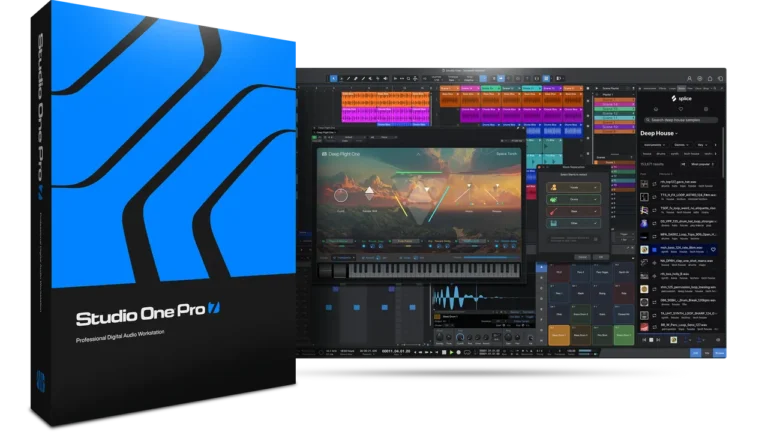
Studio One Pro 7 – 一款满足所有需求的 DAW 您的一体化制作中心,包含录音、制作、混音、母带处理和表演所需的一切。
欢迎来到您的新工作流程
Pro 7 为制作人、节拍制作人和音乐家提供了新的工具,帮助他们创作出最好的作品。
内置启动器
- 集成启动器:一种全新的音乐录制、编排和创作方式,与时间线协同工作,实现灵活的工作流程。
- 细胞与场景:
- 单元格:包含音频事件/部分或乐器部分。
- 场景:垂直堆叠的单元格,在播放场景时同时播放。
- 播放列表:将场景整理成播放列表,以创建完整的歌曲或现场表演。
主要特点:
- 使用循环和图案网格创建和编辑新的编排。
- 直接将音频或 MIDI 录制到 Cells 中。
- 使用所有可用的编辑工具编辑单元格内容。
- 将单元格组合成场景,并创建任意数量的播放列表。
- 将 Launcher 的实时表演实时录制到时间线,或离线渲染。
- 在时间轴和启动器之间拖放元素。
- 可通过 ATOM、ATOM SQ 或 Studio One Remote 进行手动控制。
- 原生支持 Novation Launchpad mini [MK3]、Launchpad X 和 Launchpad Pro [MK3]。
场景和播放列表
- 场景播放列表检查器:位于启动器和浏览器之间,方便场景组织和重复设置。
- 现场表演:场景可以无限循环播放,直到接到继续播放的指令。
新循环能力
- 事件和片段循环工具:适用于任何事件或片段类型,简化了安排和制作。
- 事件循环选项:新增上下文菜单选项,可循环播放事件或片段,直到歌曲结束标记或下一个事件/片段。
全球转置
- 移调会话:使用 élastique Pro 音高转换算法实时更改调性。
- 实时移调:直接从传输面板移调音频轨道和乐器轨道。
人工智能茎分离
- AI 驱动的音轨分割:将混合音频分割成鼓、贝斯、和弦和人声,并将它们添加到新音轨中。
- 创建伴奏版本:可将分割的音频事件合并回单个文件中。
高级节奏检测
- 全新电平检测技术:改进了短循环和变速长录音的节奏映射。
- 节奏检测:右键单击任何音频事件,即可检测并显示其节奏。
笔记编辑器中的影响集成
- 内置编辑器:直接从模式编辑器和音符编辑器窗口访问所有 Impact 乐器参数。
进一步的混音和编辑改进
- 音符编辑器缩放工具栏:用于编辑音阶/音高的音符事件的新功能。
- 自定义音阶编辑器:支持自定义音阶的编辑和预设管理。
- 按音阶筛选音符:隐藏所选音阶之外的音高,以便更快地编辑。
- 隐藏未使用的音高:钢琴视图中的新选项。
- 音高分辨率和步数:现已在旋律模式中提供。
- 笔记选择改进:提高了精确度并可立即高亮显示。
与 Splice 集成
- Splice 集成:从 Studio One Pro 7 浏览器直接访问 Splice 的采样库。
- 应用内采样查找工具:使用“按声音搜索”工具查找匹配的循环和声音。
- 数千个优质采样:使用免费的 Splice 帐户即可访问高级循环和采样库。
- 订阅计划:订阅 Splice 即可访问数百万个样本。
- 7 天免费试用:Splice 新用户可享受免费试用。
可拆卸浏览器
- 可分离浏览器窗口:可调整大小并移动到单独的显示器。
浏览器和内容方面的其他改进
- 动态标签菜单:根据可用性筛选标签。
- 自然排序:改进编号物品的排序顺序。
- 展开列表视图:在“循环”选项卡中显示其他文件信息。
新型虚拟仪器——Deep Flight One
- Deep Flight One:不断演变的音景、氛围质感和高级预设,现已作为独立乐器推出。
CV Instrument、首席架构师、Presence XT 编辑器等等
- 新增 CV 乐器:直接从 Studio One Pro 7 控制复古或现代模拟设备。
- Lead Architect:包含在所有永久许可证中,提供强大的主音和独奏音色。
- Presence XT 编辑器:现已包含在所有附加声音库中,可进行强大的采样编辑和声音设计。
- CLAP 插件和乐器支持:一种可在所有平台上使用的全新开源音频插件格式。
Studio One Pro 7 – one DAW for all Your all-in-one production center with everything you need to record, produce, mix, master and perform.
Welcome to your new workflow
Pro 7 delivers new tools for producers, beatmakers, and musicians to help them create their best work.
Built-in Launcher
- Integrated Launcher: New way to record, arrange, and create music, working alongside the Timeline for flexible workflows.
- Cells and Scenes:
- Cells: Contain audio events/parts or instrument parts.
- Scenes: Vertical stacks of cells, play simultaneously when a Scene is played.
- Playlists: Organize Scenes into Playlists to create complete songs or live performances.
Key Features:
- Create and edit new arrangements with a grid of loops and patterns.
- Record audio or MIDI directly into Cells.
- Edit Cell contents with all available editing tools.
- Combine Cells into Scenes and create any number of playlists.
- Record live Launcher performances to the timeline in real-time or render offline.
- Drag and drop elements between the timeline and Launcher.
- Hands-on control via ATOM, ATOM SQ, or Studio One Remote.
- Native support for Novation Launchpad mini [MK3], Launchpad X, and Launchpad Pro [MK3].
Scenes and Playlists
- Scene Playlist Inspector: Located between Launcher and Browser for easy scene organization and repeat settings.
- Live Performance: Scenes can loop indefinitely until commanded to continue.
New Cycle Capabilities
- Loop Tool for Events and Parts: Available for any Event or Part type, simplifies arrangement and production.
- Event Loop Option: New context menu option to loop Events or Parts until the Song End Marker or next Event/Part.
Global Transposition
- Transpose Sessions: Change keys in real-time using élastique Pro pitch-shifting algorithms.
- Real-time transposition: Transpose both audio and instrument tracks directly from the transport panel.
Stem Separation with AI
- AI-Powered Stem Splitting: Split mixed audio into drums, bass, chords, and vocals, and add them to new tracks.
- Create Instrumental Versions: Option to combine split audio events back into a single file.
Advanced Tempo Detection
- New Level Detection Technology: Improved tempo mapping for short loops and long recordings with variable tempo.
- Tempo Detection: Right-click on any audio event to detect and display its tempo.
Impact Integration in Note Editor
- Built-in Editor: Access all Impact instrument parameters directly from the Pattern and Note Editor windows.
Additional Mixing and Editing Improvements
- Note Editor Zoom Toolbar: New features for editing note events in scale/pitch.
- Scale Editor for Custom Scales: Supports custom scales with editing and preset management.
- Filter Notes by Scale: Hide pitches outside the selected scale for faster editing.
- Hide Unused Pitches: New option in Piano view.
- Pitch Resolution and Step Count: Now available in Melodic mode patterns.
- Note Selection Improvements: Enhanced precision and immediate highlighting.
Integration with Splice
- Splice Integration: Direct access to Splice’s sample library from within the Studio One Pro 7 browser.
- In-app Sample Finder Tool: Find matching loops and sounds using the Search with Sound tool.
- Thousands of Premium Samples: Access a premium library of loops and samples with a free Splice account.
- Subscription Plans: Subscribe to Splice for access to millions of samples.
- 7-Day Free Trial: Free trials available for new Splice users.
Removable Browser
- Detachable Browser Window: Resizable and movable to a separate monitor.
Additional Browser and Content Improvements
- Dynamic Tag Menu: Filter tags based on availability.
- Natural Sorting: Improved sorting order for numbered items.
- Expanded List View: Displays additional file information in the Loops tab.
New Virtual Instrument – Deep Flight One
- Deep Flight One: Evolving soundscapes, atmospheric textures, and advanced presets, now available as a standalone instrument.
CV Instrument, Lead Architect, Presence XT Editor, and More
- New CV Instrument: Control vintage or modern analog gear directly from Studio One Pro 7.
- Lead Architect: Included with all perpetual licenses, offering powerful leads and solo sounds.
- Presence XT Editor: Now included, with all additional sound libraries, for powerful sample editing and sound design.
- CLAP Plug-in and Instrument Support: New open-source audio plug-in format available across all platforms.
演示视频需要梯子❗️资源持续更新❗️永久会员全站资源免费下载❗️统一解压密码: lsypstudio.com 或 qq...qqn❗️如遇到"任何问题"请 添加右下角微信
付费资源
© 版权声明
本站内容均来自网络整理,仅供个人学习、研究或欣赏。严禁商业或盈利性使用。下载后请于24小时内删除。使用时请遵守当地法律,获取版权人授权并支付费用。 本站仅为资源信息展示平台(资讯站),不储存资料,不提供安装/使用支持。相关支持信息不代表本站立场。赞助完全自愿,不支持退款,仅为支持本站维护提升体验。非购买资源,如需购买请通过文中信息联系原作者/公司。
THE END
![多频段贝斯合成器UVI Rumble v1.0.1 U2B [MacOSX]-乐声音频-资源网](https://lsypstudio.com/wp-content/uploads/2026/06/image-2026-06-28T222016.359-800x592.jpg)
![乐器均衡器Final Mix Software WESTLAKE EQ III v3.0.3 [WiN, MacOSX]-乐声音频-资源网](https://lsypstudio.com/wp-content/uploads/2026/08/image-2026-08-07T221527.916-800x215.jpg)
![母带处理的真正艺术Steinberg WaveLab Pro 13 v13.0.30 [WiN]-乐声音频-资源网](https://lsypstudio.com/wp-content/uploads/2026/08/下载-8-1-800x533.jpg)

![母带处理-LANDR Mastering Plugin PRO v1.1.35 U2B FIXED [MacOSX]-乐声音频-资源网](https://lsypstudio.com/wp-content/uploads/2025/12/image-520.png)
![高级混响处理工作站Cloudy Samples Cyberverb RETAiL [WiN, MacOSX]-乐声音频-资源网](https://lsypstudio.com/wp-content/uploads/2026/08/image-2026-08-09T084613.681-800x800.jpg)
![用于音乐、音频和多媒体的图形化环境Cycling ’74 Max v9.1.5 [WiN]-乐声音频-资源网](https://lsypstudio.com/wp-content/uploads/2026/08/image-2026-08-06T085744.742.jpg)
![Kush Audio Bundle v2025.11 [U2B] [MacOSX]-乐声音频-资源网](https://lsypstudio.com/wp-content/uploads/2025/12/image-551.png)