

![图片[1]-Homebrew 原生图形界面管理工具Taphouse 1.5.6.6 MacOS-乐声音频-资源网](https://lsypstudio.com/wp-content/uploads/2026/08/image-91-1024x735.png)
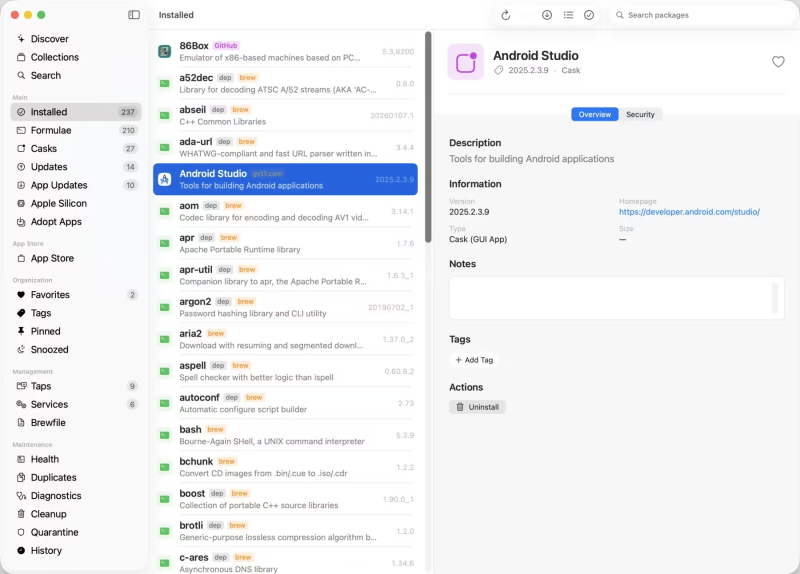
Taphouse 是一款专为 macOS 设计的 Homebrew 原生图形界面管理工具。它让用户无需使用复杂的终端命令行,就能通过可视化界面轻松浏览、安装、更新和清理 Mac 上的 Brew 软件及服务。
File Size: 27.7 MB
通过这款简洁的 Mac 原生应用,即可安装、更新和清理您的酿造软件包。支持超过 14,000 个配方和酒桶——无需终端。
几秒钟即可回滚错误的升级。
每次升级前(您也可以设置定时升级),Taphouse 都会保存一个还原点。如果更新导致某个工具出现故障,您可以立即恢复到之前的版本:无需重新构建,也无需费力寻找旧版本下载。
查看您的包裹存放位置。
原生 SwiftUI,旨在融入 macOS 系统,而非窗口内的网页视图。
虽然并非唯一,但却是最全面的。
本文客观地比较了 Taphouse 与其他 macOS 上 Homebrew 图形用户界面 (GUI) 的优劣。对于竞争对手同样优秀的条目,我们也标注了 ✓。
系统要求
• macOS 14 或更高版本
• Apple Silicon 或 Intel Core 处理器
Install, update, and clean up your brew packages from a quiet Mac‑native app. 14,000+ formulae and casks — no terminal required.
Roll back a bad upgrade in seconds.
Before every upgrade — and on a schedule if you like — Taphouse saves a restore point. If an update breaks a tool, put the exact previous version back instantly: no rebuilding, no hunting down old downloads.
See where your packages live.
Native SwiftUI, designed to feel like part of macOS — not a web view in a window.
Not the only one — but the most complete.
An honest look at how Taphouse compares to other Homebrew GUIs on macOS. The rows where competitors are equally good get a ✓ too.
System Requirements
• macOS 14 or later
• Apple Silicon or Intel Core processor
Homepage
![多频段贝斯合成器UVI Rumble v1.0.1 U2B [MacOSX]-乐声音频-资源网](https://lsypstudio.com/wp-content/uploads/2026/06/image-2026-06-28T222016.359-800x592.jpg)

![乐器均衡器Final Mix Software WESTLAKE EQ III v3.0.3 [WiN, MacOSX]-乐声音频-资源网](https://lsypstudio.com/wp-content/uploads/2026/08/image-2026-08-07T221527.916-800x215.jpg)



![母带处理-LANDR Mastering Plugin PRO v1.1.35 U2B FIXED [MacOSX]-乐声音频-资源网](https://lsypstudio.com/wp-content/uploads/2025/12/image-520.png)




![DDMF Virtual Audio Stream v2.0.2 x32 x64 WiN Rev5 [WiN]-乐声音频-资源网](https://lsypstudio.com/wp-content/uploads/2026/07/image-2026-07-27T181536.537.jpg)
![高级混响处理工作站Cloudy Samples Cyberverb RETAiL [WiN, MacOSX]-乐声音频-资源网](https://lsypstudio.com/wp-content/uploads/2026/08/image-2026-08-09T084613.681-800x800.jpg)

![用于音乐、音频和多媒体的图形化环境Cycling ’74 Max v9.1.5 [WiN]-乐声音频-资源网](https://lsypstudio.com/wp-content/uploads/2026/08/image-2026-08-06T085744.742.jpg)











