

![图片[1]-加速 AI 视频抠像与遮罩去除(视觉Matting)插件ONYX AI Matte v3.3.0 x64-乐声音频-资源网](https://lsypstudio.com/wp-content/uploads/2026/08/image-73-1024x575.png)
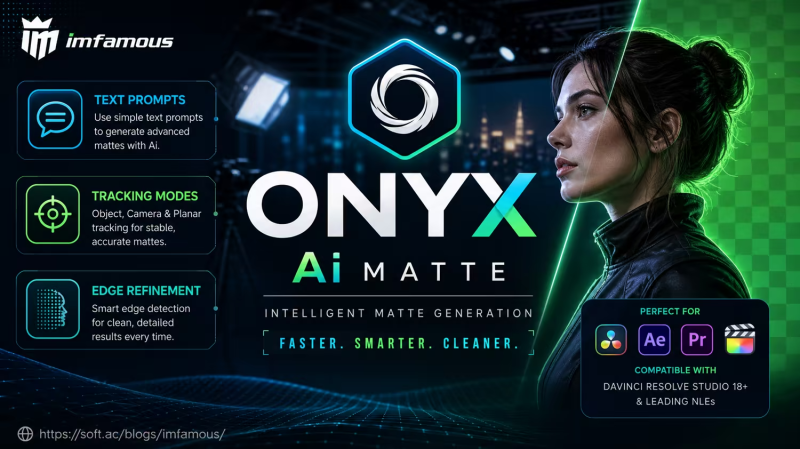
ONYX Ai Matte 是一款由 Evgeniy Shatskiy 开发的 GPU 加速 AI 视频抠像与遮罩提取(Matting)插件。它专为视觉特效(VFX)艺术家打造,旨在省去繁琐的手工转描(Roto)工作,能高精度处理头发、毛发、运动模糊和半透明边缘。
主要功能与特点
- 多模式提示:支持点(Point)、框(Box)、文本(Text)和遮罩(Mask)提示来引导 AI 生成遮罩。
- 多目标追踪:多数模式下可同时追踪多达 32 个对象,文本模式下最高可达 64 个。
- 复杂边缘处理:在快速运动、毛发或半透明材质的边缘能保持出色的稳定性和抠像质量。
File size: 3.69 GB
ONYX Ai Matte 是一款专业的 AI 遮罩提取插件,
适用于 DaVinci Resolve、Fusion Studio、Nuke、Flame 和 Natron 等软件,支持 Windows、Linux 和 macOS 系统。它专为需要高质量遮罩但又不想花费数小时手动抠像的视觉特效艺术家而设计。该插件基于 Meta SAM3 引擎,并集成了 VitMatte 和 MEMatte 优化器,采用统一的工作流程:文本、点、框和遮罩提示在单个场景中协同工作,对象能够自动跨帧跟踪。
主要功能
统一流程 — 在一个场景中提供框、点、文本和遮罩提示,最多可处理 16 个对象
文本提示 — 输入任何对象类别(或多个,以逗号分隔)以自动检测所有实例
点选择 — 单击以分割特定对象;正/负点用于细化
边界框 — 绘制框以快速进行矩形选择
遮罩提示输入 — 跟踪您已有的遮罩:单帧 roto 会变成完全跟踪的遮罩(也适用于子对象,例如袖子、车门);在跟踪过程中移动遮罩,校正关键帧会在该帧上设置
对象跟踪 — 遮罩自动跨帧传播;任何镜头均有四种跟踪模式 对象
管理器 — 画布面板,用于单独处理、关键帧可见性设置、细化和删除对象
三重映射 + 高清细化器 — 从遮罩自动生成三重映射; VitMatte/MEMatte 优化边缘。优化
器直接输入 — 将任何遮罩(您的抠像,或在 Mocha 或其他系统中跟踪的遮罩)直接连接到优化器,以获得电影级 Alpha 边缘效果。
双优化器 — VitMatte(默认)和 MEMatte,可即时切换 — 为您的素材选择最佳方案。TensorRT
加速 — 在 NVIDIA RTX GPU 上实现 3-4 倍的优化器推理速度提升
。时间平滑和边缘稳定 — 减少帧间闪烁,实现流畅的运动效果。
边缘控制 — 羽化、收缩/膨胀、偏移、色阶、二值阈值,用于微调。
叠加预览 — 可自定义颜色的实时遮罩预览。
烘焙到磁盘 — 将遮罩缓存到磁盘;重新打开项目即可播放,无需引擎和显存。
完美适用于
多角色场景:查找所有人物,单独识别特定演员;
提取复杂的毛发和皮毛,呈现电影级边缘效果;
通过文本优先发现快速商业制作周期;
在 Nuke、DaVinci Resolve、Fusion Studio、Flame 和 Natron 中进行 4K+ 合成;
通过 Refiner Direct 工作流程优化外部遮罩(抠像、平面跟踪)的边缘。
系统要求:/ 技术规格
操作系统:Windows 10/11 64 位
AI 模型:Meta SAM3 + VitMatte + MEMatte (ONNX, FP16)
加速:Windows/Linux 系统使用 NVIDIA CUDA 12.6 + TensorRT 10.x,macOS 系统使用 Apple 神经网络引擎 (CoreML)
驱动程序:NVIDIA R560 或更新版本 (CUDA 12.6) — 仅限 Windows/Linux
显存:最低 6GB / 建议 8GB 以上 — macOS 系统无需独立 GPU
内存:最低 16GB / 4K 分辨率下建议 32GB
GPU:NVIDIA RTX 20 系列或更新版本 (RTX 2060+, SM 7.5+) — Windows/Linux
操作系统:Linux (glibc 2.28+:Ubuntu 20.04+、Debian 10+、Rocky/RHEL/AlmaLinux 8+) · macOS 15 Sequoia 或更新版本苹果芯片——M1、M2、M3、M4、M5 或更新
版本;主机软件:DaVinci Resolve、Fusion Studio、Nuke、Flame、Natron——任何兼容 OFX 的应用程序(Windows 和 Linux 系统需 Nuke 13 及以上版本,macOS 系统需 Nuke 15 及以上版本);
不支持:GTX 1000 系列、AMD Radeon、Intel Arc——以及基于 Intel 的 Mac 电脑。
Professional AI Matte Extraction Plugin for OFX
ONYX Ai Matte is a hardware-accelerated matting plugin for DaVinci Resolve, Fusion Studio, Nuke, Flame and Natron — on Windows, Linux and macOS — built for VFX artists who need production-quality mattes without hours of manual roto work. Powered by Meta SAM3 with the VitMatte and MEMatte refiners, it runs one unified pipeline: text, point, box and mask prompts work together in a single scene, and objects track across frames automatically.
KEY FEATURES
Unified Pipeline — Box, Point, Text and Mask prompts in one scene, up to 16 objects
Text Prompts — Type any object class (or several, comma-separated) to detect all instances automatically
Point Selection — Click to segment a specific object; positive/negative points for refinement
Bounding Box — Draw a box for quick rectangular selection
Mask Prompt Input — Track a mask you already have: a one-frame roto becomes a fully tracked matte (works for sub-objects too — a sleeve, a car door); move the mask mid-track and a correction key is set right on that frame
Object Tracking — Masks propagate across frames automatically; four tracking modes for any shot
Object Manager — On-canvas panel to solo, keyframe visibility, refine and delete objects
Trimap + HQ Refiner — Automatic trimap from the masks; VitMatte/MEMatte refine the edges
Refiner Direct Input — Connect any matte (your roto, or a mask tracked in Mocha or another system) straight to the refiner for cinema-quality alpha edges
Dual Refiners — VitMatte (default) and MEMatte, switchable instantly — pick the best for your footage
TensorRT Acceleration — 3-4x faster refiner inference on NVIDIA RTX GPUs
Temporal Smoothing & Edge Stabilization — Reduce flickering across frames for clean motion
Edge Controls — Feather, shrink/grow, offset, levels, binary threshold for fine-tuning
Overlay Preview — Real-time mask preview with customizable colors
Bake to Disk — Cache masks to disk; reopen the project and play back with no engine and no VRAM
PERFECT FOR
Multi-character scenes: find all people, solo specific actors
Complex hair and fur extraction with cinema-quality edges
Fast commercial turnaround with text-first discovery
4K+ compositing in Nuke, DaVinci Resolve, Fusion Studio, Flame and Natron
Edge-refining external mattes (roto, planar-tracked) via the Refiner Direct workflow
System requirements: / TECHNICAL SPECS
OS: Windows 10/11 64-bit
AI Models: Meta SAM3 + VitMatte + MEMatte (ONNX, FP16)
Acceleration: NVIDIA CUDA 12.6 + TensorRT 10.x on Windows / Linux — Apple Neural Engine (CoreML) on macOS
Driver: NVIDIA R560 or newer (CUDA 12.6) — Windows / Linux only
VRAM: 6GB minimum / 8GB+ recommended — no separate GPU needed on macOS
RAM: 16GB minimum / 32GB for 4K
GPU: NVIDIA RTX 20-series or newer (RTX 2060+, SM 7.5+) — Windows / Linux
OS: Linux (glibc 2.28+: Ubuntu 20.04+, Debian 10+, Rocky/RHEL/AlmaLinux 8+) · macOS 15 Sequoia or newer on Apple Silicon — M1, M2, M3, M4, M5 or newer
Hosts: DaVinci Resolve, Fusion Studio, Nuke, Flame, Natron — any OFX-compatible app (Nuke 13+ on Windows and Linux, Nuke 15+ on macOS)
Not supported: GTX 1000-series, AMD Radeon, Intel Arc — and Intel-based Macs
Homepage

![乐器均衡器Final Mix Software WESTLAKE EQ III v3.0.3 [WiN, MacOSX]-乐声音频-资源网](https://lsypstudio.com/wp-content/uploads/2026/08/image-2026-08-07T221527.916-800x215.jpg)

![为您提供直接从录音中学习您喜爱的歌曲并高效练习的工具Aurally Sound Song Master PRO v5.0.02 [WiN]-乐声音频-资源网](https://lsypstudio.com/wp-content/uploads/2026/08/下载-6-1-800x512.jpg)

![母带处理的真正艺术Steinberg WaveLab Pro 13 v13.0.30 [WiN]-乐声音频-资源网](https://lsypstudio.com/wp-content/uploads/2026/08/下载-8-1-800x533.jpg)
![FM、频谱、波表、虚拟模拟和颗粒合成Steinberg HALion 7 v7.5.0 [WiN]-乐声音频-资源网](https://lsypstudio.com/wp-content/uploads/2026/08/下载-7-1-800x534.jpg)

![频谱动态压缩器-Sonible Smart Comp 3 v1.0.1 [WiN]-乐声音频-资源网](https://lsypstudio.com/wp-content/uploads/2025/12/image-521.png)
![母带处理-LANDR Mastering Plugin Pro v1.1.35 [WiN]-乐声音频-资源网](https://lsypstudio.com/wp-content/uploads/2025/12/image-522.png)