

![图片[1]-Waves – Ultimate 17 v2026.06.23 for WiN-乐声音频-资源网](https://lsypstudio.com/wp-content/uploads/2026/06/image-2026-06-30T082047.485-300x300.jpg)
- 版本:v2026.06.23
- 格式:VST、VST3、AAX
- 类别:VST插件
- 系统要求:Windows 10 或更高版本
- 许可证类型:完整版
- 下载大小:9.88 GB(R2R)+ 9.84 GB(VR)
Waves 提供超过 240 款插件。创作完全自由:一切尽在掌握。让您脑海中的声音与扬声器中传出的声音之间没有任何阻碍。Waves Complete 是我们 Waves Creative Access 订阅服务中最全面的选项,它能满足您随时随地使用所有插件的需求。
所有热门的 Waves 人声插件。所有模拟合成器型号,从 Abbey Road 到 SSL。所有 Waves 母带处理插件。所有压缩器、均衡器、效果器、乐器、饱和度插件、艺术家签名插件、通道条、AI 降噪……应有尽有。Waves Ultimate 提供最全面的专业级音频插件套装。
Waves Ultimate 提供市面上最完整的专业级音频插件套装。所有热门的 Waves 人声插件。所有模拟电路模型,从 Abbey Road 到 SSL。所有 Waves 母带处理插件。所有压缩器、均衡器、效果器、乐器、饱和度插件、艺术家签名插件、通道条、AI 降噪插件。
所有热门的 Waves 人声插件。所有模拟合成器型号,从 Abbey Road 到 SSL。所有 Waves 母带处理插件。所有压缩器、均衡器、效果器、乐器、饱和度插件、艺术家签名插件、通道条、AI 降噪。Waves Ultimate 提供市面上最完整的专业音频插件套装。
新插件IDX 智能动态
提升能量、爆发力和专注力的最佳工具
IDX Intelligent Dynamics 是一款智能频率感应压缩器,可优化音轨能量,从而增强表现力和焦点。只需一个主旋钮,即可瞬间让您的混音焕发活力。
还在为如何给你的混音增添活力而苦恼吗?
如果你的声音听起来平淡无奇或缺乏活力,IDX 可以帮你找到提升能量的最佳方法。它能智能优化音轨的能量,精准地在需要的地方进行处理,为你带来梦寐以求的冲击力和能量。
你的混音作品是否难以从扬声器中清晰呈现?
IDX 利用覆盖整个频率范围的多个检测器来塑造音轨的包络,从而在不牺牲深度的前提下提供直截了当的声音。
IDX的工作原理
这款插件的智能算法能够自动识别频率范围内负载最高的区域——这些区域消耗能量,但对乐器或人声的音色却没有贡献。然后,它使用“渐进衰减”(而非传统压缩器,后者会持续降低超过阈值的信号均方根值)来压缩这些区域。这样一来,决定音轨关键特征的频率范围就能获得相对优势,从而更加突出。
提示:在插件链的开头、多个轨道甚至主总线上插入 IDX,它将为你构建混音的其余部分奠定坚实的基础。
感觉精神萎靡或无法集中注意力?
单独听音轨可能很棒,但在混音中却可能显得模糊不清。IDX智能动态技术专注于重要的音轨信息,使其清晰呈现,从而带来更鲜明、更有冲击力的声音。
不再有不干净的混合物
借助 IDX 智能动态技术,您会感受到人声更加突出,鼓声瞬态更加清晰,低音更加强劲有力。将 IDX 应用于混音中的多个音轨,您会感受到整个混音焕发活力。
易于混合,效果最佳
将 IDX 置于插件链的起始位置,可以压缩导致刺耳和轰鸣的频率,从而无需使用均衡器来解决这些问题。IDX Intelligent Dynamics 利用其智能压缩算法,还能提升重要的“好”频率,使其在混音中更加突出。
微调压缩速度,以获得强劲或柔和的效果。
IDX 的响应速度可通过两种模式进行控制:硬模式提供快速响应,非常适合瞬态声音,例如鼓和打击乐器,或需要额外冲击力的场合;软模式提供更平滑、更慢的响应,非常适合需要更自然感觉的非打击乐器声音。
调整低音/高音动态范围,以获得更暗或更亮的音色。
倾斜控制旋钮用于调节高频和低频的压缩量。向一个方向旋转会增加高频的压缩,从而产生更暗沉的音色;向另一个方向旋转会增加低频的压缩,从而产生更明亮的声音。
提升您的现场音效
IDX Intelligent Dynamics 还包含零延迟版本,使其成为现场应用的理想工具。只需简单滑动几下,IDX 即可对现场混音中的任何输入通道或编组进行超快速的动态控制。
特征
- 立即消除任何音源上的共振、杂音、刺耳声、不平衡和音调不一致。
- 让你的混音不再充满压力,聆听它美妙的展开。
- 注意不要过度处理
- 线性相位滤波器,声音通透,无失真
- 学习功能提供自定义增益衰减曲线
- 通过 SC 功能学习可实现完美的去掩蔽和频率强调。
- Rider 功能仅允许在音频来自 SC 时降低增益。
- 动态自动增益控制可匹配输入信号的均方根值,且不会浪费能量。
- 设定点增益衰减曲线的形状和斜率可以调节音调
- 通过 3 个可调节适配器和 2×8 个节点实现额外控制
- 瞬间优化赛道能量,提升冲击力和专注力
- 将元素凸显出来,并增强清晰度
- 为你构建混音奠定坚实的基础
- 瞬间让沉闷的曲目焕发生机
- 采用频率相关的渐进式淡出
- 自动压缩频段中最繁忙的区域
- 快速匹配功能可立即平衡输入和输出电平
- 使用硬模式和软模式控制响应速度
- 使用倾斜控制调节明暗色调
- 适用于现场演出的零延迟版本
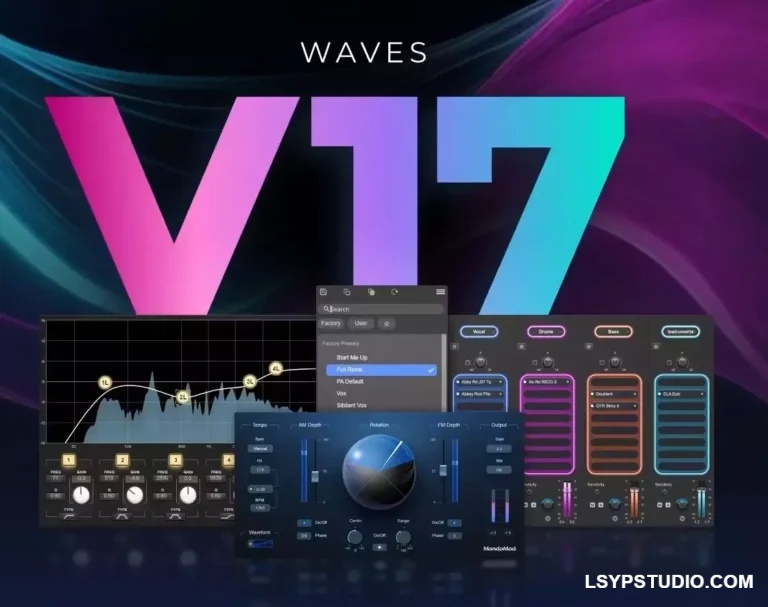
v17版本新增了哪些内容?
Waves插件新版本。运行效率更高。音质更佳。
享受 Waves 大多数插件全新改进的预设菜单、改进的录音室和现场工作插件,以及 StudioVerse 中新增的实时混音重新平衡功能。
使用预设的新工作流程
找到理想的声音不应该那么难。在 Waves 17 版本中,大多数插件都采用了改进的预设工作流程,这将帮助您更快地工作、保持专注,并实现不间断的创作。
新的预设界面更加人性化,导航更加快捷,让用户可以直接在插件内查找、整理和管理声音。
- 立即搜索并选择预设。
- 预设类别之间平滑过渡。
- 将您最喜欢的预设保存到一个集中列表中。
- 直接在插件的图形界面中创建和整理预设。
- Live 和 Studio 插件的改进
想增强混音成品中的人声,但没有多轨录音?或者想截取一段循环乐段,去掉鼓点,使其更符合你的需求?
隆重推出 Mix Unlock,这是我们庞大的在线预设库 StudioVerse 的一项全新高级功能。Mix Unlock 可在您的 DAW 中实时运行,因此您可以在播放声音的同时对其进行调整。
只需几秒钟,即可将完成的混音、采样或循环乐段拆分为人声、鼓、贝斯和乐器,然后使用数百个 StudioVerse 预设进行重新塑造和处理。
更多宏功能:StudioVerse 音频效果现在支持 13 页上多达 104 个可分配宏,让您对整个 StudioVerse 系统拥有前所未有的控制权。
Over 240 plugins from Waves. Create with complete freedom: everything at your fingertips Let nothing stand between the sound you hear in your head and what comes out of your speakers. With Waves Complete, the largest option in our Waves Creative Access subscription, you get all the plugins you need, when you need them.
All popular Waves vocal plugins. All analog models, from Abbey Road to SSL. All Waves mastering plugins. All the compressors, all the EQs, all the effects, instruments, saturation plugins, artist signature plugins, channel strips, AI noise reduction… just everything. Waves Ultimate offers the most comprehensive set of professional quality audio plugins.
Waves Ultimate offers the most complete set of professional-quality audio plugins anywhere. All the popular Waves vocal plugins. All the analog models, from Abbey Road to SSL. All the Waves mastering plugins. All the compressors, all the equalizers, all the effects, instruments, saturation plugins, artist signature plugins, channel strips, AI-powered noise reduction.
All the popular Waves vocal plugins. All the analog models, from Abbey Road to SSL. All the Waves mastering plugins. All the compressors, all the EQs, all the effects, instruments, saturation plugins, artist signature plugins, channel strips, AI noise reduction. Waves Ultimate offers the most complete set of professional audio plugins anywhere.
New Plugin IDX Intelligent Dynamics
The best tool for Energy, Punch and Focus
IDX Intelligent Dynamics is an intelligent frequency-sensitive compressor that optimizes the energy of your tracks for greater expression and focus. Instantly bring your mix to life with just one master knob.
Struggling to add energy to your mix?
If your sounds feel flat or lack extra energy, IDX will help you find the best way to add energy. It intelligently optimizes the energy of your tracks, applying processing exactly where it’s needed, giving you the punch and energy you’ve been missing.
Having trouble getting your mix to pop out of your speakers?
Using multiple detectors across the entire frequency range, IDX shapes the envelope of your tracks, delivering a straight-ahead sound without sacrificing depth.
How IDX Works
The plugin’s clever algorithm automatically identifies the most loaded areas of the frequency range – those that consume energy but do not contribute to the tone of an instrument or vocal. It then compresses them using “progressive attenuation” (as opposed to a traditional compressor, which steadily reduces the RMS of a signal above a threshold). As a result, the frequency ranges that determine the key characteristics of a track gain a relative advantage and stand out.
Tip: Insert IDX at the beginning of your plugin chain, on multiple tracks, and even on the master bus, and it will give you a solid foundation on which to build the rest of your mix.
Feeling sluggish or unable to concentrate?
Sounds can be great on their own, but can seem washed out in the context of a mix. IDX Intelligent Dynamics focuses on important track information, making it clear for a more defined and impactful sound.
No more dirty mixes
With IDX Intelligent Dynamics, you’ll feel vocals move forward, drum transients remain clear, and bass becomes punchy and defined. Place IDX on multiple tracks in your mix, and you’ll feel the entire mix come alive.
Easy mixing, maximum results
Placing IDX at the beginning of the plugin chain compresses frequencies that cause harshness and boominess, eliminating the need for EQ to address these issues. Using its intelligent compression algorithm, IDX Intelligent Dynamics also boosts important “good” frequencies, bringing them forward in the mix.
Fine-tune the compression speed to achieve a punchy or smooth effect
Control the response speed of the IDX with two modes: Hard provides a fast response, ideal for transient sounds like drums and percussive elements, or when an extra punch is needed. Soft provides a smoother, slower response, ideal for non-percussive sounds that need a more natural feel.
Adjust the bass/treble dynamics to achieve a darker or brighter tone.
The Tilt control adjusts the amount of compression of the high and low frequencies. Turning it one way compresses the high frequencies more, resulting in a darker tone. Turning it the other way compresses the low frequencies more, resulting in a brighter sound.
Improve your live sound
IDX Intelligent Dynamics also includes a zero-latency version, making it a great tool for live applications. With just a few simple swipes, IDX provides ultra-fast dynamic control over any input channel or group in your live mix.
Features
- Instantly eliminate resonance, dirt, harshness, imbalance and tonal inconsistency on any source
- Take the stress out of your mix and hear it beautifully unfold
- Take care not to over-process
- Linear phase filters, transparent sound, no artifacts
- Learn function provides a customized gain reduction curve
- Learn via SC function provides perfect unmasking and frequency emphasis
- Rider function allows gain reduction only when audio is coming from the SC
- Dynamic automatic gain control matches the RMS value of the input signal, without wasting energy
- Set point gain reduction curve shape and slope allows tonality adjustment
- Additional control with 3 adjustable adapters and 2×8 nodes
- Instantly optimizes track energy for more impact and focus
- Brings elements to the forefront and adds clarity
- Gives you a solid foundation to build your mix on
- Instantly brings dull tracks to life
- Uses frequency-dependent progressive fade-out
- Automatically compresses the busiest areas of the frequency range
- Instantly balance input and output levels with Quick Match
- Control the speed of response with hard and soft modes
- Adjust bright and dark tones with the tilt control
- Zero-latency version for live sound
What’s new in v17?
New version of Waves plugins. Work more efficiently. Sound better.
Enjoy a new and improved preset menu for most Waves plugins, improved plugins for studio and live work, and real-time mix rebalancing added to StudioVerse.
New workflow with presets
Finding the perfect sound shouldn’t be difficult. In version 17, most Waves plugins feature a revamped preset workflow that will help you work faster, stay focused, and create without interruption.
The new preset interface is more user-friendly and quick to navigate, making it easier to find, organize, and manage sounds right within the plugin.
- Instantly search and select presets.
- Smooth transition between preset categories.
- Save your favorite presets in one centralized list.
- Create and organize presets directly in the plugin’s graphical interface.
- Improvements to Live and Studio plugins
Want to enhance the vocals in a finished mix but don’t have a multitrack recording? Or take a loop and remove the drums to make it more suited to your needs?
Introducing Mix Unlock, a new premium feature of StudioVerse, our extensive online preset library. Mix Unlock works in real time within your DAW, so you can manipulate the sound while it’s playing.
In seconds, a finished mix, sample, or loop can be split into vocals, drums, bass, and instruments, then reshaped and processed using hundreds of StudioVerse presets.
More macro capabilities: StudioVerse audio effects now support up to 104 assignable macros across 13 pages, giving you unprecedented control over your entire StudioVerse system.
![乐器均衡器Final Mix Software WESTLAKE EQ III v3.0.3 [WiN, MacOSX]-乐声音频-资源网](https://lsypstudio.com/wp-content/uploads/2026/08/image-2026-08-07T221527.916-800x215.jpg)

![为您提供直接从录音中学习您喜爱的歌曲并高效练习的工具Aurally Sound Song Master PRO v5.0.02 [WiN]-乐声音频-资源网](https://lsypstudio.com/wp-content/uploads/2026/08/下载-6-1-800x512.jpg)

![母带处理的真正艺术Steinberg WaveLab Pro 13 v13.0.30 [WiN]-乐声音频-资源网](https://lsypstudio.com/wp-content/uploads/2026/08/下载-8-1-800x533.jpg)
![FM、频谱、波表、虚拟模拟和颗粒合成Steinberg HALion 7 v7.5.0 [WiN]-乐声音频-资源网](https://lsypstudio.com/wp-content/uploads/2026/08/下载-7-1-800x534.jpg)
![母带处理-LANDR Mastering Plugin PRO v1.1.35 U2B FIXED [MacOSX]-乐声音频-资源网](https://lsypstudio.com/wp-content/uploads/2025/12/image-520.png)
![频谱动态压缩器-Sonible Smart Comp 3 v1.0.1 [WiN]-乐声音频-资源网](https://lsypstudio.com/wp-content/uploads/2025/12/image-521.png)
![母带处理-LANDR Mastering Plugin Pro v1.1.35 [WiN]-乐声音频-资源网](https://lsypstudio.com/wp-content/uploads/2025/12/image-522.png)