

![图片[1]-AI语音转文字软件VovSoft Audio to Lyrics Converter 1.0 win-乐声音频-资源网](https://lsypstudio.com/wp-content/uploads/2026/06/image-2026-06-14T170310.154-300x300.jpg)
File size: 133.4 MB
一款专为Windows平台设计的AI语音转文字软件。它能够自动提取音频/视频中的人声并转换为文本,常被用于提取歌词、听写录音或转录会议的工具。
Vovsoft Audio to Lyrics Converter 是一款用户友好、轻巧的 Windows 实用程序,旨在自动从音频文件生成文本转录。该软件采用离线 AI 模型,能够“聆听”您的音频文件,并准确提取其中的语音或歌词,最终输出与音频时间完美匹配的歌词或字幕文件。
由于 AI 推理在您的本地计算机上运行,因此您无需保持网络连接或订阅昂贵的云 API。您的音频文件将完全保密,处理过程直接由您的硬件完成。
主要功能
:广泛支持多种格式:无缝兼容主流音频格式,包括 MP3、WAV、OGG 和 FLAC。
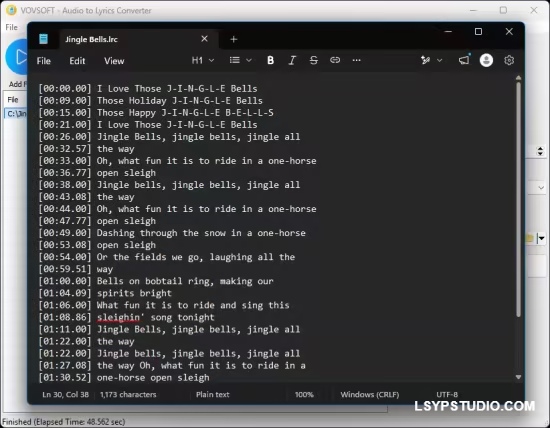
多种输出格式:可将转录文本导出为标准 LRC 文件(适用于音乐播放器)、SRT 或 VTT 文件(适用于视频字幕)或纯 TXT 文件(便于阅读)。
离线 AI 处理:可选择不同的本地 AI 模型(例如轻量级的 465 MB 模型),在不依赖云服务器的情况下平衡转换速度和转录准确性。
批量处理:轻松将单个音轨或整个文件夹添加到队列,一次性无缝转换多个音频文件。
同步时间戳:自动生成精确的时间戳标签(例如 [00:26.00]),确保歌词与音轨的节奏完全一致。
可自定义行长:调整生成文本的最大行长,确保字幕或歌词在任何屏幕尺寸或媒体播放器上都能完美显示。
拖放支持:只需将文件或文件夹直接拖放到软件界面中,即可快速加载音频文件。
离线版 OpenAI Whisper:在您的电脑本地使用功能强大、技术先进的 OpenAI Whisper 模型。无需网络连接,确保您的音频文件得到安全私密的处理。
非常适合为
卡拉OK或数字音乐库创建LRC字幕文件。
可为视频内容自动生成字幕(SRT/VTT)。
可将播客、访谈或讲座转录为纯文本。
系统要求: Windows 11、Windows 10(64 位)
Vovsoft Audio to Lyrics Converter is a user-friendly, lightweight Windows utility designed to automatically generate text transcripts from audio files. Powered by offline AI models, this software “listens” to your tracks and accurately extracts the spoken or sung words, outputting them into perfectly timed lyric or subtitle files.
Because the AI inference runs locally on your machine, you don’t need an active internet connection or expensive cloud API subscriptions. Your audio files remain completely private, and processing is handled directly by your hardware.
Key Features
Wide Format Support: Works seamlessly with popular audio formats, including MP3, WAV, OGG, and FLAC.
Multiple Output Formats: Export your transcriptions as standard LRC files for music players, SRT or VTT files for video subtitles, or plain TXT files for easy reading.
Offline AI Processing: Select from different local AI models (such as the lightweight 465 MB model) to balance conversion speed and transcription accuracy without relying on cloud servers.
Batch Processing: Easily queue up individual tracks or add entire folders to convert multiple audio files in one seamless operation.
Synchronized Timestamps: Automatically generates precise timestamp tags (e.g.,[00:26.00]) so your lyrics match the exact pacing of the audio track.
Customizable Line Lengths: Adjust the maximum line length of the generated text to ensure your subtitles or lyrics look perfect on any screen size or media player.
Drag and Drop Support: Quickly load your audio tracks by simply dragging and dropping files or folders directly into the software interface.
Offline OpenAI Whisper: Utilizes powerful, state-of-the-art OpenAI Whisper models locally on your PC. No internet connection is required, ensuring your audio files are processed securely and privately.
Perfect For
Creating LRC files for karaoke or digital music libraries.
Generating automatic subtitles (SRT/VTT) for video content.
Transcribing podcasts, interviews, or lectures into plain text.
System Requirements: Windows 11, Windows 10 (64-bit)
Homepage

![乐器均衡器Final Mix Software WESTLAKE EQ III v3.0.3 [WiN, MacOSX]-乐声音频-资源网](https://lsypstudio.com/wp-content/uploads/2026/08/image-2026-08-07T221527.916-800x215.jpg)


![为您提供直接从录音中学习您喜爱的歌曲并高效练习的工具Aurally Sound Song Master PRO v5.0.02 [WiN]-乐声音频-资源网](https://lsypstudio.com/wp-content/uploads/2026/08/下载-6-1-800x512.jpg)

![母带处理的真正艺术Steinberg WaveLab Pro 13 v13.0.30 [WiN]-乐声音频-资源网](https://lsypstudio.com/wp-content/uploads/2026/08/下载-8-1-800x533.jpg)




![FM、频谱、波表、虚拟模拟和颗粒合成Steinberg HALion 7 v7.5.0 [WiN]-乐声音频-资源网](https://lsypstudio.com/wp-content/uploads/2026/08/下载-7-1-800x534.jpg)

![频谱动态压缩器-Sonible Smart Comp 3 v1.0.1 [WiN]-乐声音频-资源网](https://lsypstudio.com/wp-content/uploads/2025/12/image-521.png)
![母带处理-LANDR Mastering Plugin Pro v1.1.35 [WiN]-乐声音频-资源网](https://lsypstudio.com/wp-content/uploads/2025/12/image-522.png)












