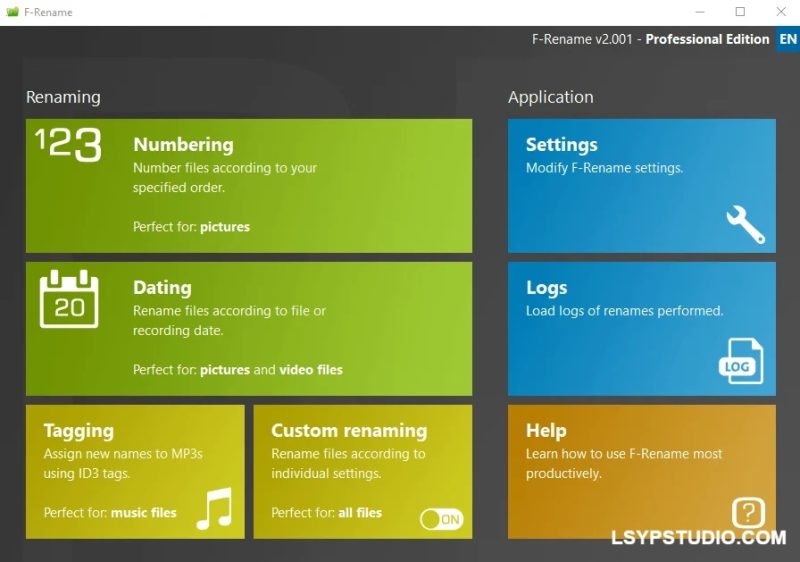


![图片[1]-高效文件批量重命名工具F-Rename Professional 3.000 Multilingual-乐声音频-资源网](https://lsypstudio.com/wp-content/uploads/2026/04/image-2026-04-25T080147.483.jpg)
File size: 10 MB
一款专为Windows系统设计的高效文件批量重命名工具。它能够根据用户定义的规则,一次性对任意数量的文件进行重命名,是整理杂乱数据、建立文件结构的高效助手。
F-Rename:快速轻松地重命名文件。DSC813913091.JPG、20110920.AVI、DL_MUSICFILE.MP3——每个电脑用户都知道:这些毫无意义的文件名是由数码相机、智能手机或下载管理器生成的。
F-Rename为数据黑暗中带来光明,可根据自由选择模式重命名任意数量的文件。轻松应用不同的预制重命名模式或自定义模式。
只需点击几下鼠标,即可根据ID3标签为整个文件集合编号或标注日期,并为MP3文件命名。
单独重命名功能提供了最大的灵活性。它不仅允许您使用多个标签,还有助于转换、缩短现有文件名,以及部分或完全替换现有文件名。
预览和日志功能确保您永远不会丢失对宝贵数据的跟踪。
F-Rename: Quickly and easily rename files. DSC813913091. JPG, 20110920.AVI, DL_MUSICFILE. MP3 – every computer user knows them: meaningless file names, generated by the digital camera, smartphone or download manager.
F-Rename brings light into the data dark and renames any number of files according to freely selectable patterns. It’s easy to apply different pre-made renaming patterns or individual patterns.
Number or date entire file collections and name your MP3 files with just a few mouse clicks based on ID3 tags.
The individual renaming function offers the highest possible flexibility. Not only does it allow you to use many tags, but it also helps to convert, shorten, and partially or completely replace existing file names.
The preview and log features ensure that you never lose track of your valuable data.
Homepage

![乐器均衡器Final Mix Software WESTLAKE EQ III v3.0.3 [WiN, MacOSX]-乐声音频-资源网](https://lsypstudio.com/wp-content/uploads/2026/08/image-2026-08-07T221527.916-800x215.jpg)


![为您提供直接从录音中学习您喜爱的歌曲并高效练习的工具Aurally Sound Song Master PRO v5.0.02 [WiN]-乐声音频-资源网](https://lsypstudio.com/wp-content/uploads/2026/08/下载-6-1-800x512.jpg)

![母带处理的真正艺术Steinberg WaveLab Pro 13 v13.0.30 [WiN]-乐声音频-资源网](https://lsypstudio.com/wp-content/uploads/2026/08/下载-8-1-800x533.jpg)




![FM、频谱、波表、虚拟模拟和颗粒合成Steinberg HALion 7 v7.5.0 [WiN]-乐声音频-资源网](https://lsypstudio.com/wp-content/uploads/2026/08/下载-7-1-800x534.jpg)

![频谱动态压缩器-Sonible Smart Comp 3 v1.0.1 [WiN]-乐声音频-资源网](https://lsypstudio.com/wp-content/uploads/2025/12/image-521.png)
![母带处理-LANDR Mastering Plugin Pro v1.1.35 [WiN]-乐声音频-资源网](https://lsypstudio.com/wp-content/uploads/2025/12/image-522.png)












