

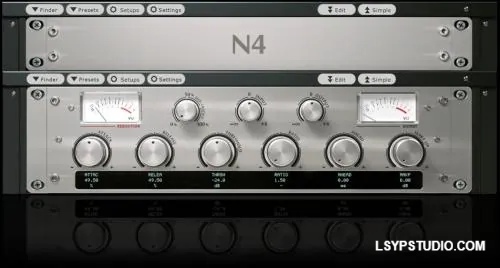
![图片[1]-高音和低音功率失真Tim P SCS Treble and Bass Power distortion v2.5 [Nebula]-乐声音频-资源网](https://lsypstudio.com/wp-content/uploads/2026/04/image-2026-04-25T074227.591.jpg)
P2P | 23 April 2026 | 65 MB
这是高音和低音的电子管功率部分。
功能:
两个失真预设,
一个音色预设,
N3/N4 日版皮肤。v2
版本提供三个预设可供选择:两个失真预设和一个音色预设(输出部分的频率响应)。
基本失真预设有三个旋钮:失真度、电源和衰减。1
. 失真度:使用此旋钮增加输入,以获得所需的过载量。2
. 电源:此旋钮改变放大器的特性或感觉。这在吉他上会更加明显。3
. 衰减:找到理想的失真效果后,使用此旋钮调节预设的音量。
混合失真预设增加了一个混合控制(干/湿)。此预设与基本预设略有不同,因为它具有增益补偿功能。当您加大预设的驱动力时,您可能会注意到音量减小。因此,我们为该预设设置了音量控制而不是衰减控制。
形状预设:
形状预设可置于失真预设之前或之后使用。若置于失真预设之前,会影响过载的紧致度;若置于失真预设之后,则会产生较重的中频音色。
使用方法
:要将高音和低音串联成吉他音链,请使用以下
顺序:高音和低音均衡/前置放大器 &qt; Powershape &qt; Power Dist。
注意:为了获得完整的放大器音色,您可能需要在音链的最后添加一个吉他箱体脉冲响应。另请注意,此音色包不包含高音和低音均衡/前置放大器。
重要提示:
在立体声/总线应用中使用时,必须在两侧各使用一个实例。建议使用 MetaPluqin 等程序。
This is the tube power section of treble and bass.
Features:
Two distortion presets
One shape preset
n3/n4 jpn skins
For v2 we have three presets to choose from. Two distortion presets and one Shape preset (Frequency response of output section.)
The basic distortion preset has three knobs, Distortion, Power supply and Attenuation.
1. Distortion: use this knob to increase input to get the desired amount of overdrive.
2. Power Supply: this knob changes the character or the feel of the amp. This will be more noticeable on guitar.
3. Attenuation: Use this knob to adjust the volume of the preset after you have found your distorted sweet spot.
The Mix distortion Preset has an added Mix control (wet/dry). This preset works slightly different from the basic one in that it is gain compensated. As you drive the preset harder you may notice the volume decreasing. So we have a volume instead of attenuate for this preset.
Shape preset
The shape preset is used before or after the distortion preset, this will affect the tightness of the overdrive if placed before and will give a heavy mid sound if placed after
In use
To chain Treble and bass to use as guitar chain-
Treble and bass Eq/pre>Powershape>Power Dist
Note- for a complete amp sound you may want to use a guitar cab Impulse last in the chain. Also note this pack does not include Treble and bass Eq/pre.
Important
When using in stereo/bus applications, you must use a instance either side. use a program like meta plugin.
https://www.timpetherick.co.uk/downloads/scs-treble-and-bass-power-expansion/
乐币20
![乐器均衡器Final Mix Software WESTLAKE EQ III v3.0.3 [WiN, MacOSX]-乐声音频-资源网](https://lsypstudio.com/wp-content/uploads/2026/08/image-2026-08-07T221527.916-800x215.jpg)

![母带处理的真正艺术Steinberg WaveLab Pro 13 v13.0.30 [WiN]-乐声音频-资源网](https://lsypstudio.com/wp-content/uploads/2026/08/下载-8-1-800x533.jpg)




![FM、频谱、波表、虚拟模拟和颗粒合成Steinberg HALion 7 v7.5.0 [WiN]-乐声音频-资源网](https://lsypstudio.com/wp-content/uploads/2026/08/下载-7-1-800x534.jpg)
![母带处理-LANDR Mastering Plugin PRO v1.1.35 U2B FIXED [MacOSX]-乐声音频-资源网](https://lsypstudio.com/wp-content/uploads/2025/12/image-520.png)
![频谱动态压缩器-Sonible Smart Comp 3 v1.0.1 [WiN]-乐声音频-资源网](https://lsypstudio.com/wp-content/uploads/2025/12/image-521.png)
![母带处理-LANDR Mastering Plugin Pro v1.1.35 [WiN]-乐声音频-资源网](https://lsypstudio.com/wp-content/uploads/2025/12/image-522.png)

![高级混响处理工作站Cloudy Samples Cyberverb RETAiL [WiN, MacOSX]-乐声音频-资源网](https://lsypstudio.com/wp-content/uploads/2026/08/image-2026-08-09T084613.681-800x800.jpg)
![弹性电平器 AI 辅助软底限位门Mercurial Tones Tether v1.2.1 [WiN]-乐声音频-资源网](https://lsypstudio.com/wp-content/uploads/2026/08/下载-3-800x583.jpg)
![Kush Audio Bundle v2025.11 [U2B] [MacOSX]-乐声音频-资源网](https://lsypstudio.com/wp-content/uploads/2025/12/image-551.png)











