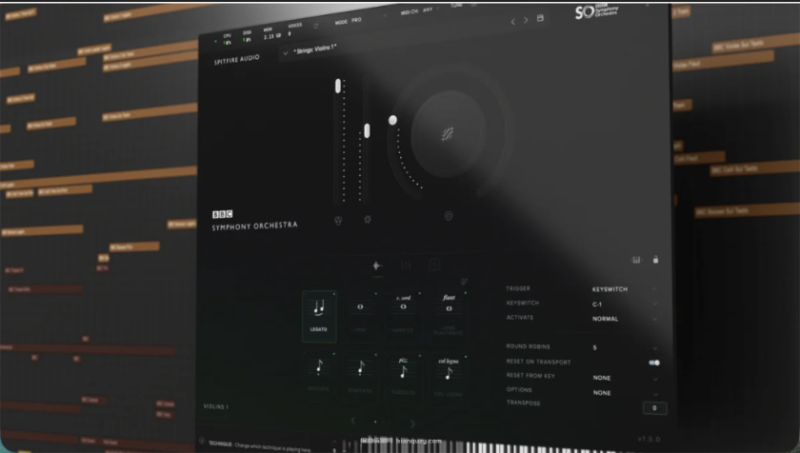


![图片[1]-Spitfire Audio BBC Symphony Orchestra Professional v1.7.0-589 GB 带视频安装教程-乐声音频-资源网](https://lsypstudio.com/wp-content/uploads/2025/12/image-120.png)
借助来自世界知名的英国广播公司(BBC)交响乐团与喷火音频(Spitfire Audio)联合打造的顶级管弦乐采样库,创作恢弘壮丽的配乐作品。
如专业人士般创作配乐
通过这款集大成的全能管弦乐插件,创作电影级配乐 —— 该插件容量达 630GB,包含 67 件乐器(涵盖合奏乐器与独奏乐器),所有采样均在伦敦标志性的梅达谷录音室(Maida Vale Studios)以极致细节录制而成。这座录音室曾为甲壳虫乐队(The Beatles)、大卫・鲍伊(David Bowie)录制作品,亦见证过无数获奖电影配乐的诞生。
专业级精心打造的音色
喷火音频(Spitfire Audio)拥有超过 15 年的采样制作经验,此次从多角度捕捉了弦乐、铜管乐、木管乐与打击乐的音色,为创作提供极致的灵活性与表现力 —— 所有音色均集成于其直观且屡获殊荣的插件中。这款插件由作曲家为作曲家打造。
无可比拟的表现力
提供 468 种基础及进阶演奏技法,助你营造极具情感深度、细腻层次与丰富表现力的音效,其中包括喷火音频备受推崇的连奏音色库(legato patches)。
极致的创意与掌控力
包含 20 组专业精选的信号预设,可即时获得适合混音的音色质感,让你的配乐脱颖而出;同时提供 12 个麦克风拾音位置与 3 种混音版本,助你对音色实现极致掌控。
产品信息
体验由世界级 BBC 交响乐团带来的管弦乐采样最高标准。全套管弦乐触手可及,涵盖弦乐、铜管乐、木管乐与打击乐 —— 所有乐器均在标志性的梅达谷录音室录制。音色集成于喷火音频(Spitfire Audio)屡获殊荣的专属插件中,提供三个版本供选择,且各版本完全兼容。《BBC 交响乐团专业版》(BBC Symphony Orchestra Professional)为不同水平的音乐创作者提供通用起点,无论是入门新手,还是专业作曲家,均可使用。
产品亮点:
- 630GB 的音色资源
- 67 种不同乐器(含合奏乐器与独奏乐器)
- 468 种演奏技法(连奏、断奏、重音奏等)
- 20 组信号预设(专业混音快照),可即时获得适合混音的音色质感
- 12 个麦克风拾音位置,3 种混音版本
- 更多完整功能列表,可查看喷火音频官网(链接见此)。
在黑色星期五来临前,先找点乐子吧。该采样库由一位中国开发者破解,最早于 8 月现身。经测试,其在 Windows 11 系统上可正常运行,但目前仅支持 VST3 格式。嘿,朋友,最后让我们一起庆祝黑色星期五的到来吧!
安装步骤:
- 将 “BBC Symphony Orchestra (64 Bit).vst3” 插件文件复制到以下路径:C:\Program Files\Common Files\VST3
- 将 “Patch.dll” 文件复制到你的数字音频工作站(DAW)根目录。
- 将 “Spitfire Audio” 文件夹复制到以下路径:C:\Users\(你的电脑用户名)\AppData\Roaming
- 打开你复制的 “Spitfire Audio” 文件夹,进入 “Settings” 子文件夹,找到 “Spitfire.properties” 文件,编辑其中的采样库路径,以关联该采样库。注意:路径中需使用双反斜杠(\)。
- 双击 “license.reg” 文件,点击 “是”,导入注册信息。
- 打开你的数字音频工作站(DAW),加载该插件,即可开始使用。
Compose epic scores with the ultimate orchestral sample library from the world-renowned BBC’s symphony orchestra and Spitfire Audio.
Score like a pro
Compose cinematic scores with the ultimate, all-in-one orchestra plugin – 630GB, 67 instruments, including groups and soloists, captured in the finest detail at London’s iconic Maida Vale Studios – host to The Beatles, David Bowie and countless award-winning movie scores.
Expertly engineered sounds
Bringing over 15 years of sampling experience, Spitfire Audio have captured strings, brass, woodwind and percussion at every angle, for ultimate flexibility and expression – presented in their intuitive, award-winning plugin. Made for composers, by composers.
Unmatched expression
Choose from 468 essential and advanced techniques for ultimate emotional depth, nuance and expression, including Spitfire Audio’s highly coveted legato patches.
Ultimate creativity & control
Access 20 expertly curated signal presets for instant, mix-ready textures that will make your scores stand out, as well as 12 mic positions and 3 mixes for ultimate control over your sound.
Product Information
Experience the highest standard in orchestral sampling with the world-class BBC Symphony Orchestra. A complete orchestra at your fingertips, featuring strings, brass, woodwinds and percussion – all recorded at the iconic Maida Vale Studios. Presented in Spitfire Audio’s award-winning, dedicated plugin – with three editions to choose from, each fully interchangeable – BBC Symphony Orchestra Professional offers a universal starting point for music creators of every level – from those just starting out, to professional composers.
Featuring:
– 630GB of sounds
– 67 different instruments (including groups and soloists)
– 468 techniques (legato, staccato, marcato, and more)
– 20 signal presets (professionally mixed snapshots) for instant, mix-ready textures
– 12 mics, 3 mixess
– See the full features list on Spitfire Audio’s website here.
Let’s have some fun before Black Friday arrives. This library was cracked by a Chinese developer, and it first appeared back in August. After testing, it runs normally on Windows 11, though it currently supports only VST3. Hey buddy, finally, let’s celebrate the arrival of Black Friday together.
Copy the BBC Symphony Orchestra (64 Bit).vst3 plugin file to:
C:\Program Files\Common Files\VST3
Copy the Patch.dll file to the root directory of your DAW.
Copy the Spitfire Audio folder to:
C:\Users\ (your computer username)\AppData\Roaming
Open the Spitfire Audio folder you copied, go into the Settings folder, find the Spitfire.properties file, and edit the library path inside to link the library.
Note: Use double backslashes (\\).
Double-click the license.reg file, click “Yes,” and import the registration information.
Open your DAW, load the plugin, and enjoy.
乐币30
![多频段贝斯合成器UVI Rumble v1.0.1 U2B [MacOSX]-乐声音频-资源网](https://lsypstudio.com/wp-content/uploads/2026/06/image-2026-06-28T222016.359-800x592.jpg)





![全能型音乐采样包xandror2 MOAR kit [DELUXE VERSION] MULTiFORMAT-FANTASTiC-乐声音频-资源网](https://lsypstudio.com/wp-content/uploads/2026/08/image-2026-08-06T140149.657-800x800.jpg)




![世界上第一把量产实心电吉他MusicLab RealTele Source Bank [WiN]-乐声音频-资源网](https://lsypstudio.com/wp-content/uploads/2026/08/image-2026-08-07T215940.733.jpg)











